
The following Users can Reset Passwords in Dentrix: Site Managers, Dental Program Managers/Dental Practice Managers; Dental Supervisors; Scheduling Center Supervisor; Patient Access Supervisor; Billing Supervisor; EHR Support Analysts
From Dentrix Office Manager
- Select Maintenance

- Select Practice Set Up
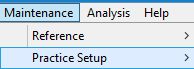
- Select Security Setup
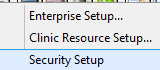
- Select Security Rights Setup

- Find User

- Highlight User

- Select Change Password

- Enter New Password
- Enter Confirm Password
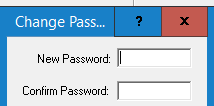
- NOTE:
- Password requirements: Your password can be between 8-11 characters, with at least one capital, one number and one symbol. ** The system will allow you to create a longer password than 11 characters however, you will not be able to log in.**
- Select Ok

- Select Change Password
- Highlight User